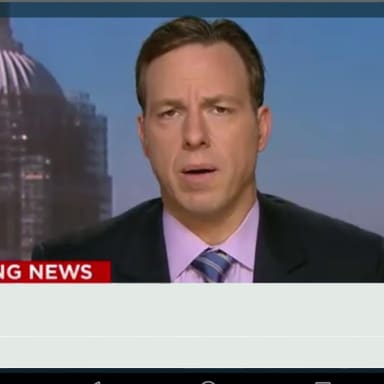
Breaking News Template Meme Template
This is a generic broadcast-news lower-third parody rather than a single named image-macro with one known creator. Its visual authority comes from familiar LIVE and BREAKING NEWS graphics, while humor comes from reporting a specific trivial or absurd everyday event with solemn, urgent newsroom language. Know Your Meme documents “Breaking News Parodies” as a family of image edits and news templates; it traces examples of a CNN-style slate and an anchor graphic to an online Photoshop prompt in 2010. Avoid presenting invented headlines as genuine current reporting.
Free to try in your browser. Add text, adjust the layout, and download your meme.
Template images may be supplied through third-party sources. Check permission, attribution, and destination-platform rules before publishing. Report a rights or removal concern.
Related meme collections

How to use this meme template
What the Breaking News Template meme means
This is a generic broadcast-news lower-third parody rather than a single named image-macro with one known creator. Its visual authority comes from familiar LIVE and BREAKING NEWS graphics, while humor comes from reporting a specific trivial or absurd everyday event with solemn, urgent newsroom language. Know Your Meme documents “Breaking News Parodies” as a family of image edits and news templates; it traces examples of a CNN-style slate and an anchor graphic to an online Photoshop prompt in 2010. Avoid presenting invented headlines as genuine current reporting.
A generic TV-news graphic with a fixed red LIVE badge at the upper left, a mostly black main screen, and a lower-third region: fixed BREAKING NEWS text on a red panel, a blue strip, a pale headline area, and a yellow footer crawl. The app’s two editable caption boxes are in the pale lower-third area and yellow footer, not on the fixed LIVE badge.
How the joke works
Slot 1 is the main fake headline in the large pale lower-third panel. State one specific, low-stakes event in a concise, clipped news style; the fixed graphic already says LIVE and BREAKING NEWS, so do not waste the slot repeating those labels. Slot 2 is the smaller yellow ticker line beneath it: add a brief follow-up, mock official reaction, consequence, or context that sharpens the joke. Make the lower ticker clearly about the same event. The contrast between formal urgency and mundane content carries the humor.
- Main satirical headline in the large lower-third panel; describe the specific trivial event as urgent news.
- Short yellow ticker follow-up that adds related context, consequence, or mock official reaction.
Caption examples
- Developer says the fix is “five minutes away” for the fourth hour in a row.
- Sources confirm the estimate has not changed since lunch.
The main line turns a familiar work delay into urgent coverage, and the ticker gives a connected deadpan detail.
- BREAKING NEWS: Something funny happened today.
- Sources confirm.
It repeats the fixed graphic label and gives a vague headline with a ticker that adds no specific joke.
Situations it fits
- a common household or office mishap exaggerated into a news alert
- a personal habit or minor delay framed as a public development
- a small software or meeting inconvenience described in clipped newsroom language
- a headline followed by a dry, related ticker detail
When this format does not fit
- Do not repeat the fixed LIVE or BREAKING NEWS labels in the editable captions.
- Do not make the ticker unrelated to the main headline.
- Do not use vague filler such as “something happened”; specify the mundane event.
- Do not invent a plausible false report about a real person or current event; keep the headline clearly fictional and low-stakes.